


Are you drowning in grading? Does the thought of the pile of papers on your desk deflate you like a balloon? Do you wish you could spend less time grading and more time… doing anything BUT grading?
There’s no doubt about it – grading assignments is one of the biggest time-sucks in teaching science. We’ve all been there… sitting at home on a Sunday night, some Netflix show on the TV, with a stack of papers to get through. (And, let’s be honest, it is usually the stack of papers I swore to get through last Sunday!)
Here are the top 5 ways I’ve found to make grading more manageable without sacrificing quality:
Want tests and quizzes that grade themselves in Google Forms without even having to manually enter in the questions? A magical little unicorn can do it for you! SERIOUSLY! It’s a Google add-on called Automagical Forms. It will read any PDF you upload and make a Google Forms test from it! (You can watch a video on how to do this HERE. It’s easy.)

It’s well worth your time to turn all your old PDF assessments into Google Forms because not only do you save time grading this year, you can reuse the same Google Form year after year. Bonus: I set mine to email students their scores immediately. They love the instant feedback, and I love not having to grade 120 tests by hand!
I got this idea from my (brilliant!) teacher-author friend Carrie from Beakers and Ink. This is one of those “why didn’t I think of that?!” ideas! As soon as I saw her post on it, I knew it would help me. Like I said… she’s brilliant.
If I have something paper-based that I need to correct that has several long answer-type questions, graphs, or other more hefty answers, I line up the papers along my long wall of counters. I grade one question at a time. This helps my brain to focus on only what is important about that particular question, instead of switching from topic to topic to topic. I walk right down the line, and then start back again at the beginning for a new question.
I’m telling you… I don’t know what the “brain hack” is behind this, but being able to stay “on task” one question at a time is a major efficiency boost.
This one’s a game-changer! Create assignments where all the answers line up on the left side of the page. Instead of having to search through the page because answers are smattered all over the place, put an answer line to the left of the question number. Line up your answer key right next to the student answers, and boom – you can grade a class set in minutes! (This is my 15-question adaptations quiz shown.)
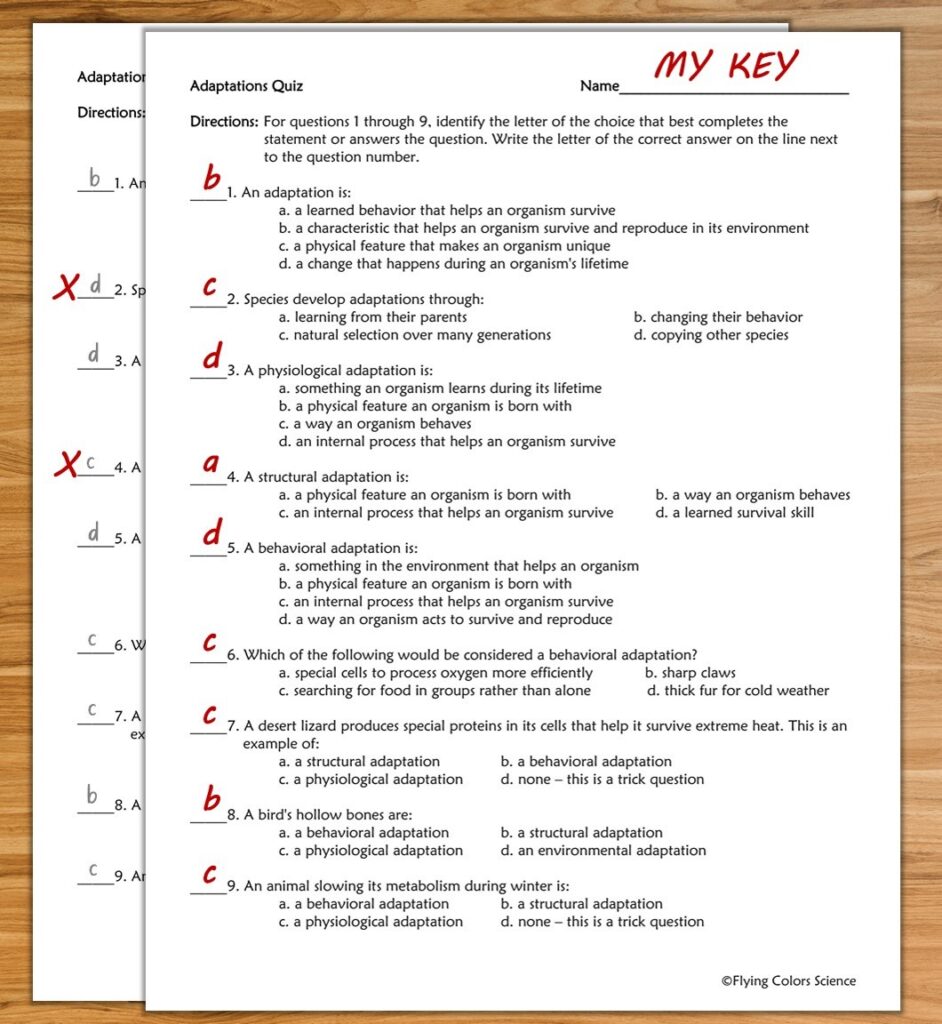
Bonus tip: Prevent cheating! I make two versions of quizzes like this. The quizzes have the same questions but in a different order. I have the copy machine copy them one after the other. (Our copy machines have a setting that does that.) So, I can pass them out at the same time, but tablemates won’t get the same quiz. Wandering eyes will see a quiz that looks like their own, but the answers are in a different order.
This changed my classroom forever and truly helps me spend less time grading. Instead of grading every single thing every single day, have students keep a “portfolio” of their skill-building work. In the very first week of school, I have each student set up a 3-ring binder (I call it their portfolio) where they store their daily, more informal activities. (I do collect and grade larger, more important assignments like labs, CERs, and formative assessments.) Everything that’s meant for learning and practice goes in the binder.
The front page of the binder has a “Portfolio Log” page that I use to record their portfolio grades. It has columns for Date, Number of Assignments Completed, Number of Assignments Demonstrating Good Effort, Grade, and Teacher Comments. Every week or two, I use class time (NOT my own prep time) to go table to table looking through binders and giving grades. I have a few items that I’m really looking for when I’m flipping through, such as a CER answer on one assignment, a graph on another assignment, etc. It doesn’t take much to figure out if a student is on track or not. I’m very generous with the grading. I don’t need to scrutinize every single answer – I just need to see evidence they’re getting the big ideas. And bonus – kids learn to organize their work! For me, every “portfolio check” counts as a quiz grade.
I’m not kidding and I don’t care if my principal sees this! Here’s the thing – not everything needs to be graded. I know, I know… it feels wrong at first. However, some assignments are purely for practice or exploring concepts. These can go straight to File 13! I tell my students upfront: “This is practice. I’m going to take a look at it [I’m not], but I’m not grading it. You’ll need to do it to understand tomorrow’s work.” Trust me, they still do it. (You won’t believe me until you try it yourself… and I don’t blame you. I wouldn’t this was true until I tried it!)
Next time you collect something that is LESS important than maintaining your sanity – send it to File 13!
The BEST way to save time is to join the Flying Colors Science Membership, a comprehensive library of over 700 rigorous, engaging NGSS-based science lessons. You’ll never write a lesson or an assessment ever again! Have every teaching resource you need right at your fingertips, available to download instantly. So long, Sunday night planning! So long, working through lunch! Get your time back!